What Is Web Hosting? Explained Simply (2026)
Web hosting is a service that stores your website’s files on a powerful computer called a server and keeps that server connected to the internet 24/7, so anyone in the world can visit your site at any time. Without hosting, your website has nowhere to live — it would just be files sitting on your personal computer that nobody else can reach. You rent space on a hosting company’s servers, typically for a few dollars a month, and they handle the technical heavy lifting.
If that still sounds abstract, do not worry. By the end of this guide, you will understand exactly how hosting works, the main types of hosting, and what to look for before you spend your first dollar.

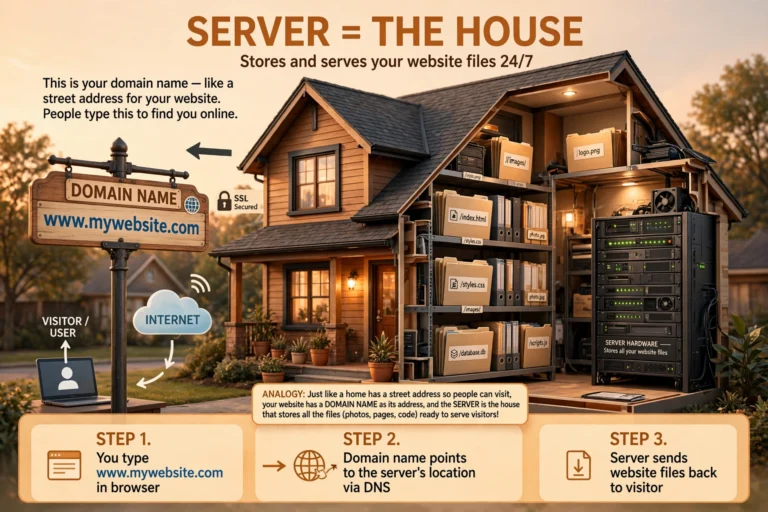
The Simple Analogy: Hosting Is Rent for Your Website
Think of building a website like opening a shop:
- Your domain name (like howlly.info) is the shop’s street address — it tells people where to find you.
- Web hosting is the rented shop space itself — the physical room where your products (your website’s files, images, and text) actually sit.
- Your website files are the furniture and stock inside the shop.
You need both an address and a space. A domain without hosting is like having a street address with no building — visitors arrive and find nothing there. Hosting without a domain works technically, but nobody can remember a raw server number, so you always pair the two.
Just like renting a shop, you pay hosting companies monthly or yearly. In return, they keep the lights on, the doors open, and the building secure — around the clock.
How Web Hosting Actually Works
Here is what happens behind the scenes, step by step:
- You sign up with a hosting company and they allocate space for you on one of their servers — powerful computers optimized to serve web pages quickly.
- You upload your website files to that server (or install software like WordPress with one click, which creates the files for you).
- You connect your domain name to the server, so typing your address leads visitors to your files.
- When someone visits your site, their browser asks your server for the files. The server sends them over in milliseconds, and the browser assembles them into the page the visitor sees.
Good hosting companies do much more than store files: they keep servers updated and secure, defend against hackers, back up your data, and keep everything running even when thousands of people visit at once. That is what your monthly fee really pays for — not just space, but reliability.
The Main Types of Web Hosting
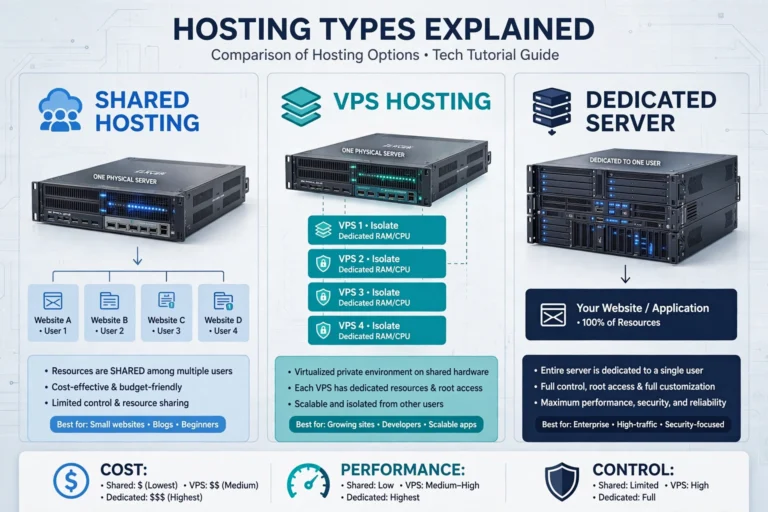
Not all hosting is the same. Here are the five types you will encounter, from cheapest to most powerful:
Shared Hosting
Your site shares one server with hundreds of other websites, splitting the cost. It is the cheapest option ($3–10/month) and perfectly fine for new blogs and small sites. The downside: if a “neighbor” site gets a traffic spike, yours can slow down. Best for: beginners and new blogs.
VPS Hosting (Virtual Private Server)
You still share a physical server, but you get your own guaranteed slice of resources — like having your own apartment instead of a dorm room. More speed and stability ($15–50/month), with a bit more technical responsibility. Best for: growing sites outgrowing shared hosting.
Dedicated Hosting
An entire physical server just for you. Maximum power, control, and cost ($80+/month). Overkill for 99% of beginners. Best for: large businesses with heavy traffic.
Cloud Hosting
Your site runs on a network of connected servers instead of one machine, so it scales instantly when traffic surges and stays online even if one server fails. Pricing is flexible — you often pay for what you use. Best for: sites with unpredictable or spiky traffic.
Managed WordPress Hosting
Hosting fine-tuned specifically for WordPress: automatic updates, built-in caching, daily backups, and expert WordPress support. It costs more than basic shared hosting ($15–40/month) but removes nearly all technical headaches. Best for: anyone serious about a WordPress site who wants zero maintenance.
My advice for beginners: start with shared hosting from a reputable company. It handles new sites easily, and you can upgrade to VPS or managed hosting later in a few clicks when your traffic grows.
What to Look for Before You Buy Hosting
Price matters, but the cheapest plan is not always the best deal. Check these six things:
- Uptime guarantee: Look for 99.9% or higher. Anything less means your site goes offline noticeably often.
- Speed: Ask about SSD storage and server locations near your audience. Slow hosting makes every page sluggish — and as our Why Is My WordPress Site Slow? guide shows, hosting is often the root cause.
- Free SSL certificate: This gives you the padlock icon (HTTPS) in browsers. Google ranks HTTPS sites higher, and visitors trust them more. Any decent host includes it free — never pay extra.
- Backups: Daily automatic backups mean you can restore your site in minutes if anything breaks. Confirm backups are included, not a paid add-on.
- Support quality: When your site breaks at midnight, 24/7 live chat with knowledgeable humans is worth more than any feature list. Check recent reviews, not just marketing claims.
- Renewal price, not just the intro price: Many hosts advertise $2.98/month but renew at $8–10/month. Always check the renewal rate before you commit — it is the price you will actually pay long-term.
Web Hosting vs. Domain Name: Do Not Confuse Them
Beginners mix these up constantly, so let us be crystal clear:
| Domain Name | Web Hosting | |
|---|---|---|
| What it is | Your web address (howlly.info) | The server space where your site lives |
| What it does | Helps people find you | Stores and serves your files |
| Typical cost | ~$10–15/year | ~$3–10/month (shared) |
| Can you have one without the other? | Yes, but visitors cannot reach a site | Yes, but nobody can find it easily |
You usually buy both when starting out — many hosts even throw in a free domain for the first year. Just remember they are separate services with separate renewal dates.
FAQ
What is web hosting in simple words?
Web hosting is renting space on a powerful internet-connected computer (a server) where your website’s files live. The hosting company keeps that computer running 24/7 so anyone can visit your site anytime.
How much does web hosting cost?
Shared hosting for beginners costs $3–10/month. VPS hosting runs $15–50/month, and managed WordPress hosting $15–40/month. Always check the renewal price — introductory discounts usually expire after the first term.
Do I need web hosting if I use Wix or WordPress.com?
No — builders like Wix and WordPress.com include hosting in their plans. You only buy separate hosting when you run self-hosted WordPress (WordPress.org) or build a site from scratch. Confused by the options? See WordPress vs Wix for Beginners.
What happens if I stop paying for hosting?
Your hosting account gets suspended and your website goes offline. Most hosts keep your files for a grace period (often 30 days) during which you can renew or move elsewhere — but do not rely on it. Keep your own backups.
Can I change hosting companies later?
Yes. Moving a WordPress site between hosts is a routine process — many hosts even migrate you for free. Your domain name stays yours regardless of where you host. So do not stress about picking the “perfect” host on day one.
Conclusion
Web hosting explained simply: it is rented space on an always-on server where your website lives, and it is what makes your site reachable to the world. Start with affordable shared hosting, insist on 99.9% uptime, free SSL, and real backups, and upgrade only when your traffic demands it.
Next steps on your journey: How to Start a Blog for Free to launch without spending, WordPress.com vs WordPress.org to pick the right WordPress flavor, and Why Is My WordPress Site Slow? to keep your future site lightning fast.