How to Start a Blog for Free in 2026
How to start a blog for free is simple: pick a free blogging platform like WordPress.com, Wix, or Blogger, sign up with your email, choose a blog name and template, customize the design, and publish your first post. The entire process takes under 30 minutes and costs nothing. Free plans come with limits — such as the platform’s branding in your web address — but they are perfect for testing your ideas before you spend a single dollar.
In this guide, I will walk you through all five steps, compare the best free platforms honestly, and show you exactly when upgrading to a paid plan actually makes sense.
Step 1: Choose the Right Free Blogging Platform
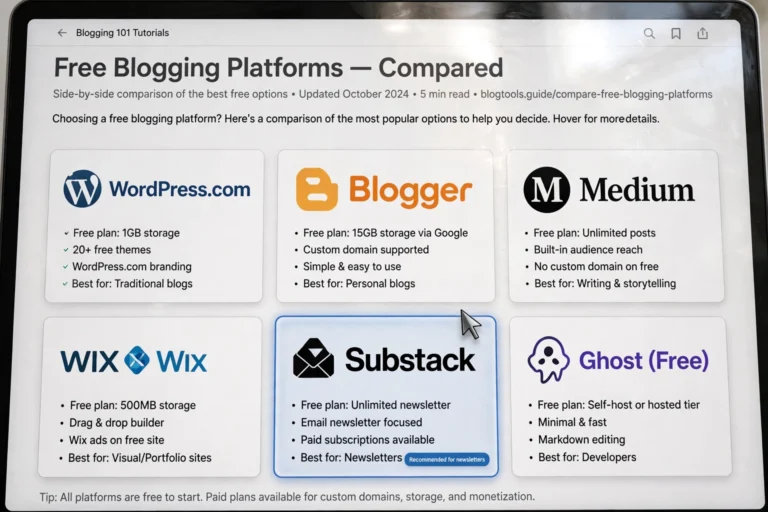
Your platform is the biggest decision you will make, because switching later is a hassle. Here are the best free options in 2026, with honest trade-offs:
- WordPress.com (free plan): The most popular choice. You get a solid block editor, decent themes, and room to grow into paid plans later. Your address will look like yourblog.wordpress.com and WordPress shows its own ads on your site.
- Wix (free plan): The easiest drag-and-drop builder for total beginners. Beautiful templates with zero learning curve. The downside: the free plan shows prominent Wix ads, and you can never fully move your site away from Wix later.
- Blogger: Google’s free blogging service. Completely free with no forced upgrade pressure, and it never expires. The catch: it looks dated, gets few updates, and Google could shut it down one day.
- Medium: Best if you only care about writing and want a built-in audience. You cannot customize the design or run your own ads, so it is a publishing platform more than a true blog.
- Substack: Ideal if your blog is really a newsletter. Free to start, easy email subscriptions, and you only pay when you charge subscribers.
My recommendation for most beginners: start with WordPress.com’s free plan. It teaches you the WordPress editor — the same system that powers over 40% of the entire web — so your skills transfer if you later upgrade. Not sure which builder fits you? Read our WordPress vs Wix for Beginners comparison first.
Step 2: Create Your Account and Pick a Blog Name
Once you have chosen a platform, setup takes minutes:
- Go to the platform’s website and click Get Started or Sign Up Free.
- Register with your email address (or sign in with Google for one-click setup).
- Choose your blog name. This becomes part of your web address, so keep it short, memorable, and easy to spell. Avoid numbers and hyphens.
- Pick a template or theme that matches your topic. You can change this later, so do not overthink it — just choose something clean and readable.
- Complete the quick onboarding questions (your blog’s topic, your goals). These help the platform suggest the right starting layout.
Tip: Your blog name matters more than your template. A clear name like “WeeknightKitchen” beats a clever-but-confusing one every time. If you are torn between two names, ask a friend which one they would remember tomorrow.
Step 3: Choose a Theme and Customize Your Blog
A clean design makes visitors trust your blog instantly. You do not need design skills — just good taste and restraint.
- Pick a simple, readable theme. White background, dark text, one accent color. Avoid cluttered themes with ten different fonts.
- Upload a logo or site icon. Even a simple text-based logo in your platform’s customizer looks professional. Free tools like Canva can make one in five minutes.
- Set up your core pages: an About page (who you are and what the blog covers), a Contact page, and a Privacy Policy page. These three pages make any blog look legitimate from day one.
- Create a simple menu. Home, About, Blog, Contact is all you need at the start.
- Preview on mobile. More than half your visitors will arrive on phones. Every major platform lets you preview the mobile view — check that text is readable and buttons are tappable.

Step 4: Write and Publish Your First Post
An empty blog convinces nobody. Your first post does not need to be perfect — it needs to exist.
- Click New Post (or the + button) in your dashboard.
- Write a clear, specific headline. “5 Easy Pasta Recipes for Busy Weeknights” beats “My Thoughts on Food.”
- Write 300–800 words answering one question or teaching one thing. Short paragraphs, subheadings, and bullet lists keep readers scrolling.
- Add at least one image. Free stock sites like Unsplash and Pexels give you professional photos at no cost.
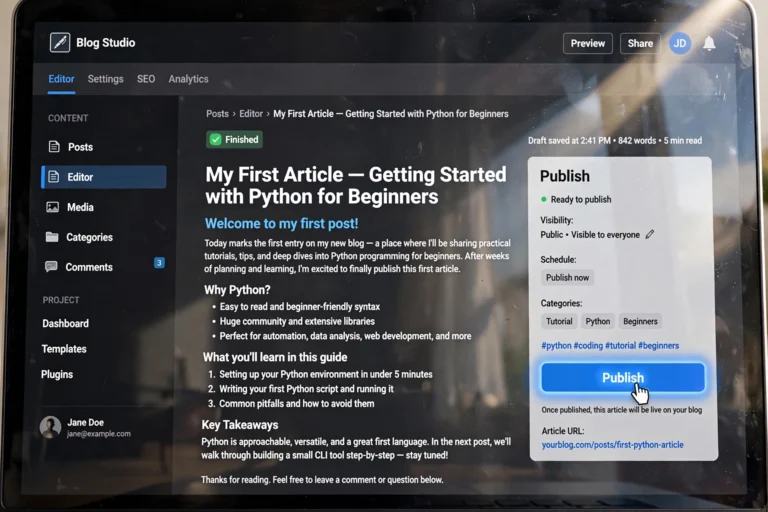
- Proofread once, then hit Publish. Done is better than perfect.
Step 5: Share Your Blog and Grow Your First Readers
Publishing is only half the job. Here is how free blogs get their first visitors:
- Share with people you know. Post the link on your social profiles. Your first 50 readers almost always come from your own network.
- Answer questions online. Find Reddit threads, Facebook groups, or Quora questions about your topic and give genuinely helpful answers with a link to your post when it fits.
- Learn basic SEO. Use clear titles and write about specific questions people search for. Search traffic is slow at first but compounds beautifully.
- Post consistently. One good post per week beats five rushed posts once.
The Catch: What Free Blog Plans Do Not Give You
Free is genuinely free, but it comes with strings attached. Know them before you invest months of work:
- Platform branding in your address: yourblog.wordpress.com instead of yourblog.com. It looks less professional and is harder to remember.
- Ads you do not control: Free plans show the platform’s ads on your blog — and you earn nothing from them.
- Limited customization: No custom plugins, limited themes, and no access to the underlying code on most free plans.
- Storage and feature caps: Free plans limit image storage, and advanced features (custom domains, analytics, e-commerce) sit behind paywalls.
- You do not fully own it: The platform can suspend your blog if you break its rules. True ownership requires self-hosting, which we explain in WordPress.com vs WordPress.org.
None of this matters much while you are testing the waters. It matters a lot once your blog earns its first dollar.
When Should You Upgrade to a Paid Plan?
Upgrade when your blog shows signs of life — not before. Good triggers:
- You are publishing consistently (at least 2–3 posts per month for three months).
- You are getting steady traffic or subscribers, even small numbers.
- You want to earn money from ads, affiliates, or products.
- The platform’s branding embarrasses you when you share your link.
The typical upgrade path: buy a custom domain (around $10–15/year) and move to paid web hosting (a few dollars a month), which removes all limits. Our What Is Web Hosting? Explained Simply guide breaks down exactly what hosting is and what to pay for.
FAQ
Is it really possible to start a blog for free?
Yes. Platforms like WordPress.com, Wix, Blogger, and Medium let you create and publish a blog with zero cost. You will have a platform-branded web address and some feature limits, but publishing itself is completely free.
Can I make money with a free blog?
It is difficult. Free plans restrict ads and monetization — WordPress.com’s free plan shows its own ads and keeps the revenue. If earning is your goal, upgrade to a custom domain and paid hosting once you have an audience.
Which free blogging platform is best for beginners?
WordPress.com’s free plan is the best all-rounder: easy to use, with room to grow into the full WordPress ecosystem later. Wix is even simpler for drag-and-drop design, while Blogger is the most hands-off option.
Do I need technical skills to start a free blog?
No. Modern platforms handle all the technical work — hosting, security, updates — for you. If you can use email and social media, you can start a blog. The only skills you need are writing clearly and publishing consistently.
How long does it take to set up a free blog?
About 20–30 minutes from signup to published first post if you do not overthink the design. Most of that time goes to choosing a name and theme. Do not spend a week “perfecting” the design before publishing — content matters far more.
Conclusion
Learning how to start a blog for free comes down to five steps: choose a platform like WordPress.com, sign up and pick a name, customize a simple theme, publish your first post, and share it with the world. Start free, publish consistently, and upgrade only when your blog proves it deserves the investment.
Ready for the next step? Compare your platform options in WordPress vs Wix for Beginners, understand the free-vs-paid divide in WordPress.com vs WordPress.org, and learn what paid hosting actually buys you in What Is Web Hosting? Explained Simply.