How to Tell If a Video Is AI Generated (2026)
How to tell if a video is AI generated comes down to a simple habit: pause the clip, zoom in, and look for the small mistakes AI still makes — extra fingers, melting backgrounds, strange blinking, and motion that does not follow real physics. AI video tools in 2026 can produce clips that look convincing at a glance, so learning these visual tells, plus a few free detection tools, is the fastest way to avoid being fooled.
This guide walks you through the process step by step: what to look for in the footage, how to check where it came from, which free tools can analyze a clip, and what to do when you are still not sure.
Why AI-Generated Videos Are Everywhere in 2026
Text-to-video tools like Sora, Runway, Pika, Luma, and Veo can turn a single sentence into a realistic 10-second clip in under a minute. That has flooded TikTok, Reels, Shorts, and X with synthetic footage — some labeled, much of it not. Most is harmless entertainment, but a growing share is used for scams, fake news, and impersonation. Spotting AI video is no longer a skill for tech people only — it is basic digital literacy.
Step 1: Pause and Inspect the Fine Details
AI video generators build each frame separately and stitch them together, so inconsistencies appear — especially when you pause at a random moment and zoom in. On a phone, pinch to zoom on a still frame. Check for these:
- Hands and fingers. The classic giveaway: extra digits, fused fingers, or hands that melt into objects.
- Teeth and mouths. Teeth that blur, shift, or morph while someone talks; smeared-looking mouths in close-ups.
- Eyes and ears. Asymmetrical eyes, mismatched pupils, or ears that look different on each side of the head.
- Skin texture. Waxy, too-perfect skin with no pores or blemishes on supposedly candid footage.
- Text and logos. Garbled signs, backwards letters, or misspelled words — AI still struggles with readable text.
- Backgrounds. Fences, railings, and patterns that bend oddly; distant people or objects that shimmer or melt.
- Edges. Flickering halos around hair, glasses, and moving objects where the AI separates subject from background.
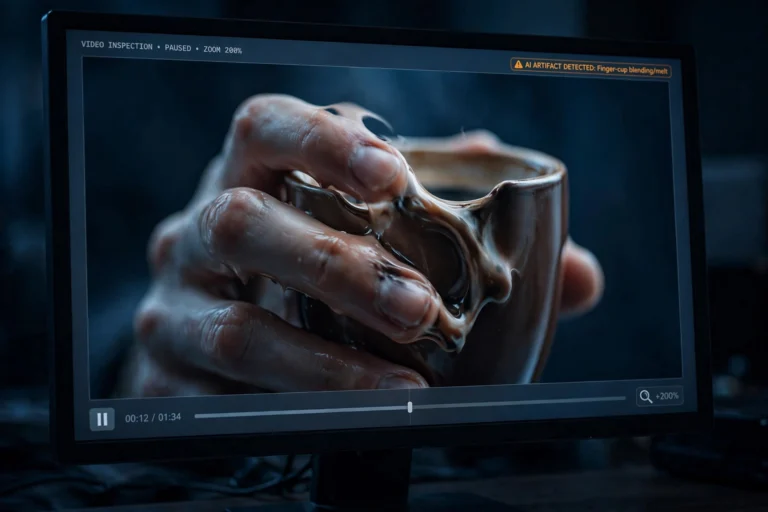
Scrub through the video slowly — AI artifacts usually appear in some frames and vanish in others, because the model redraws the scene dozens of times per second. The same uncanny smoothness shows up in AI still images too; if you want to train your eye on faces specifically, our guide to free AI headshot generators shows what synthetic portraits look like up close.
Step 2: Watch How Things Move
Motion is where AI video still struggles most. Details can be faked in a still frame, but realistic movement across time is much harder. Play the clip at 0.25x or 0.5x speed and watch for:
- Broken physics. Floating objects, shadows pointing the wrong way, water or fire behaving unnaturally.
- Strange walking. Legs that bend backwards, feet that slide along the ground instead of stepping.
- Unnatural blinking. No blinking at all in a long clip, or blinking that looks mechanical and too regular.
- Morphing objects. A dog that becomes a different animal mid-shot, a cup that turns into a phone — dead giveaways.
- Lip-sync mismatch. Mouths that do not match the words, or keep moving after the audio stops.
- Background flicker. Distant people, trees, or cars that stutter, warp, or pop in and out as the camera moves.
Real footage follows physics consistently from the first frame to the last. AI footage follows it approximately — and the longer you watch, the more the approximation breaks down.
Step 3: Check the Source Before You Believe the Clip
Sometimes the footage is hard to judge, but the video’s origin gives it away. Spend sixty seconds on the source before you trust or share a dramatic clip:
- Look at the account. New or anonymous accounts with no history and a generic username are the classic distribution channel for AI fakes.
- Check for watermarks. Many generators stamp their output. Scammers crop it out — but a suspiciously cropped corner or blurred frame edge is itself a clue.
- Look for disclosure labels. TikTok, YouTube, and Instagram require creators to label AI-generated content. Its presence settles the question instantly.
- Reverse-search key frames. Screenshot a clear frame and run it through Google Lens or TinEye to find the original or spot the same scene labeled as AI art elsewhere.
- Read the caption critically. “BREAKING” plus a dramatic claim plus no source equals assume-fake-until-proven-real.
Real, newsworthy events leave a trail: other angles, news reports, location data. An AI video usually exists in a vacuum — one account, one clip, no corroboration.
Step 4: Run It Through a Free AI Video Detector
When your eyes cannot decide, detection tools add a second opinion. They analyze pixels, compression artifacts, and frame patterns invisible to humans, returning a probability score. Useful free options include:
- Hive Moderation. Upload a clip to the free web demo and get an AI-probability score within seconds.
- Deepware Scanner. A free scanner that looks specifically for deepfake traces and face-manipulation artifacts.
- Sensity AI. Analyzes videos for face manipulation, identity swaps, and other deepfake signatures.
- TrueMedia.org. Free deepfake detection covering both video and audio, with a straightforward report.
- Content Credentials (C2PA). A provenance standard — not a detector: cameras and editing apps can embed tamper-proof metadata proving footage was captured rather than generated.
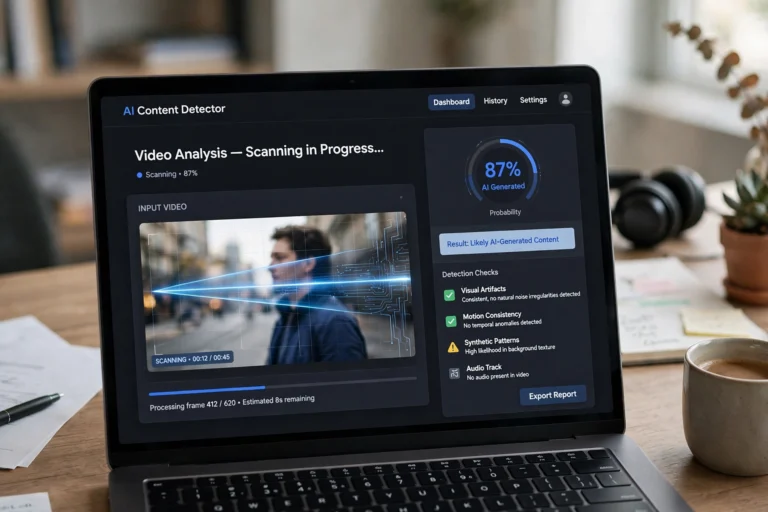
Be honest about the limits: no detector is 100 percent accurate, and the best AI videos can fool them. Treat the score as one signal — combined with the visual and source checks above, you will catch the vast majority of fakes.
The 30-Second AI Video Checklist
Once you know the tells, you can run through them almost instantly. Use this checklist whenever a video feels slightly “off”:
- Do the hands look wrong — extra fingers, fused digits, melting edges?
- Do faces look waxy, with blurry or morphing teeth?
- Does any text, sign, or logo look garbled or misspelled?
- Does motion break physics — floating objects, wrong shadows, sliding feet?
- Do background elements flicker, warp, or change shape?
- Is the account new, anonymous, or history-free?
- Has a corner been cropped or a watermark blurred out?
- Does the caption push urgency and emotion but cite no source?
“If a video makes you feel strong emotion but shows no verifiable source, treat it as AI-generated until proven otherwise.”
If you answered yes to two or more of these, run the clip through a free detector before you believe — or share — it.
What to Do When You Suspect an AI Video
Spotting a likely fake is only half the job. Handle it responsibly:
- Do not share it. Not even to debunk it — every share feeds the algorithm. Screenshot it for reference if you need to.
- Verify the claim separately. Search the event on reputable news sites. If no credible outlet is reporting it, that silence is meaningful.
- Report misleading content. TikTok, YouTube, Facebook, and X all offer reporting options for misinformation and unlabeled AI content.
- Correct people calmly. “This looks AI-generated — the hands warp at 0:04 and the account has no history” beats arguing. Point to the evidence.
- Watch for scams. Fake celebrity endorsements and fake giveaways are the most financially dangerous AI videos. If money is involved, treat it as a scam until proven otherwise.
FAQ
Can AI-generated videos fool detection tools?
Yes — especially polished clips from the latest models. Detectors are one signal, not a verdict. Layer your checks: visual tells plus source checks plus a detector score. When all three agree, you can be confident.
Do all AI videos have watermarks?
No. Many generators offer watermark-free output, and watermarks are easy to crop out. A missing watermark proves nothing — and a suspiciously cropped frame edge can itself be a sign of generated content.
What is the single easiest test for AI video?
Pause on a close-up of a face or a hand and zoom in. Even high-quality AI video usually shows artifacts at high zoom — smeared teeth, warped fingers, waxy skin — that are invisible at normal playback speed.
Can the audio reveal an AI-generated video?
Often, yes. Listen for robotic cadence, unnatural pauses, flat emotional tone, or audio that does not match the lip movements. Many fake videos pair AI visuals with AI voiceovers, and the voice is frequently the weaker of the two.
Is it legal to post AI-generated videos?
Posting AI video is generally legal, but YouTube and TikTok require creators to disclose AI-generated content, and unlabeled uploads can be removed. Using AI video to defraud, impersonate, or defame someone is illegal in many countries.
Conclusion
Learning how to tell if a video is AI generated is really about building one habit: slow down before you believe. Pause the clip and inspect the hands, faces, and text. Watch the motion at half speed for broken physics and flickering backgrounds. Check the account, the watermark, and the source. Then, when you are still unsure, let a free AI detector give you a second opinion.
No single test is perfect, but the four steps together — details, motion, source, and tools — will catch the vast majority of synthetic videos in your feed. The models keep improving, so revisit these checks every few months. And the next time a shocking clip lands in your group chat, you will be the person who spots it first.