How to Stop ChatGPT From Giving Generic Answers (2026)
How to stop ChatGPT from giving generic answers starts with understanding why they happen: the model is designed to give safe, broadly acceptable replies unless you tell it otherwise. The fix is surprisingly simple — give it sharper instructions, more context, and a clear role, and the same model produces responses that feel written just for you.
This guide shows you the exact techniques that turn bland, forgettable answers into specific, useful ones. You will learn how to set up Custom Instructions, how to write prompts that force depth and detail, and which follow-up questions push ChatGPT past its default surface-level responses.
Why ChatGPT Gives Generic Answers in the First Place
ChatGPT defaults to middle-of-the-road responses for a reason. Without clear direction, it aims for an answer that would satisfy the widest possible audience — which means short paragraphs, obvious points, and hedged language. It also tends to play it safe because overconfident specific answers risk being wrong, and the model is trained to avoid that.
The good news is that genericness is a behavior, not a fixed limit. Studies of prompt quality consistently show that well-structured prompts with context, constraints, and examples produce dramatically better output. The model has the knowledge — your job is to unlock it with better direction. Think of it this way: a vague prompt gets the generic answer, and a specific prompt gets the specific answer.
Step 1: Set Up Custom Instructions Once
Custom Instructions are the single highest-leverage fix. They run before every conversation, permanently telling ChatGPT how you want it to respond. To set them up:
- Open the settings. Click your profile icon in the bottom-left corner of ChatGPT, then choose Settings, then “Personalization” or “Custom Instructions” (the exact label changes occasionally in 2026).
- Tell it who you are. Add your job, your experience level, your location, and what you use ChatGPT for. Example: “I’m a freelance graphic designer in Chicago with 5 years of experience.”
- Tell it how to respond. This is where you kill genericness: write rules like “Give direct, specific answers — never start with obvious background I already know” and “Use concrete examples and real numbers instead of vague advice.”
- List your pet peeves. Add things like “Don’t say ‘as an AI language model,'” “No motivational filler,” and “Keep answers under 300 words unless I ask for more.”

Save your changes and test it immediately. Ask something you have asked before and compare — most people see the difference in the very first response. Custom Instructions apply to every chat, so this one-time setup keeps paying off forever.
Step 2: Write Prompts With Context, Constraints, and a Role
The prompt itself is where most generic answers are born. Compare these two prompts: “Write about email marketing” versus “You’re an email copywriter for B2B SaaS. Give me 5 subject lines for a cart-abandonment email for a $49/month project management tool, aimed at busy startup founders.” The second prompt gets a specific answer because it removed every ambiguity.
- Assign a role. Start with “You are a…” — a senior accountant, a witty travel blogger, a strict grammar teacher. Roles shift the model into a narrower, more expert voice.
- Add your constraints. Specify length, format, audience, and tone: “Explain this to a 10-year-old in under 150 words with a simple analogy.”
- Give it your situation. Two or three sentences about your context — your skill level, your goal, your tools — stop ChatGPT from explaining things you already know.
- Ask for examples and specifics. Explicitly request “include a worked example with real numbers” or “give me the actual wording, not general advice about wording.”
“Generic prompts get generic answers. The more decisions you make in the prompt, the fewer the model makes for you — and its default decisions are always the most average ones.”
This one change — spending 30 extra seconds on the prompt — is responsible for most of the quality jump people attribute to paid models or “advanced” tricks.
Step 3: Force Depth With Follow-Up Questions
Even with a decent prompt, ChatGPT’s first answer is often its most generic. Treat the first response as a starting point, not the finished product. These follow-ups consistently pull out the depth:
- “Give me a specific example of each point.” This kills abstraction instantly — the model has to commit to concrete cases.
- “What’s the non-obvious advice here — the part beginners wouldn’t know?” This directly asks it to skip the basics you could find anywhere.
- “What would you change about this if [constraint]?” Adding constraints (a tight budget, a two-week deadline, a tiny team) forces creative, situational answers.
- “Play devil’s advocate with your own answer.” This breaks the agreeable-everything-is-great pattern and surfaces trade-offs.
- “Rewrite this at half the length.” Shortening forces the model to keep only the strongest points and cut the filler.
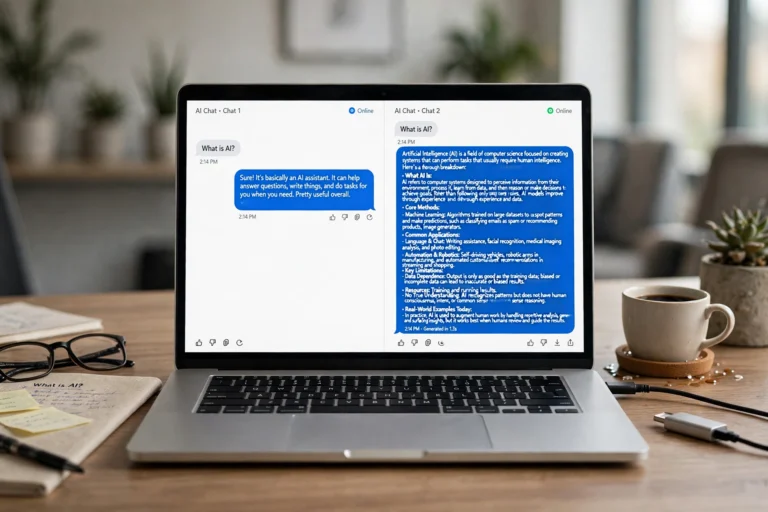
Make follow-ups a habit. The second and third answers in a conversation are almost always better than the first, because each round gives the model more to work with.
Step 4: Use Examples to Show It What “Good” Looks Like
If you have a style in mind, show it. Paste a paragraph you like and say “match this tone,” or give one example of the output format you want before asking for ten more. This technique — called few-shot prompting — is one of the most reliable ways to get non-generic results.
- Show the format. “Here’s the format I want: [example]. Now create 5 more in exactly this format.”
- Show the depth. Paste a great answer (from a previous chat or your own writing) and say “answer at this level of detail.”
- Show what to avoid. “Don’t write like this: [example of the bland corporate answer]. Write like this: [example of the punchy answer].”
Examples anchor the model’s output far more strongly than adjectives like “creative” or “detailed” ever could. One concrete example is worth a paragraph of instructions.
Step 5: Ask It to Think Before It Answers
Sometimes genericness comes from the model rushing to an answer. Adding a thinking step slows it down and deepens the response:
- “Think step by step.” Four words that measurably improve reasoning, analysis, and planning answers.
- “List the 3 most important factors first, then give your answer.” Forces prioritization instead of a flat list of equal-weight points.
- “Before answering, tell me what information you’d need to give the best answer.” This turns the conversation collaborative and surfaces gaps in your prompt.
- “Generate 3 different approaches, then recommend the best one and explain why.” Comparing options produces sharper reasoning than a single take.

Common Mistakes That Cause Generic Responses
Even people who know the tricks above sabotage themselves with these habits:
- One-word or one-sentence prompts. “Essay on climate change” or “marketing tips” can only produce averages — there is nothing to be specific about.
- Asking in a new chat every time. New chats lose all context. Keep ongoing projects in one conversation so ChatGPT remembers your situation and preferences.
- Accepting the first answer. Treating ChatGPT like Google — one question, one answer, done — wastes its biggest advantage, which is iterative conversation.
- Overusing “please” politeness instead of precision. Politeness is fine, but a friendly vague prompt is still a vague prompt.
“The people who get the best ChatGPT answers aren’t using secret prompts — they’re just being more specific about what they want, in every single message.”
FAQ
Does ChatGPT Plus give less generic answers than the free plan?
The model matters less than the prompt. A great prompt on the free tier beats a lazy prompt on the most powerful model. That said, stronger models do follow detailed instructions more faithfully, so upgrading helps — but only if your prompts are already specific.
Why does ChatGPT keep giving me bullet points?
Because nobody told it not to. Add “write in flowing paragraphs” or “format this as a short essay” to your prompt or Custom Instructions. The model’s default formatting is a habit, not a rule — you can override it anytime.
Can I save my favorite instructions for reuse?
Yes. Custom Instructions apply to all chats automatically. For project-specific needs, you can also create a custom GPT (paid plans) with its own built-in instructions, or simply start a dedicated chat and keep it as your ongoing workspace for that project.
Why does ChatGPT repeat the same phrases in every answer?
Certain phrases (“In today’s fast-paced world,” “delve,” “it’s important to note”) are statistical comfort zones. Call them out directly: “Don’t use cliché openers like ‘in today’s fast-paced world'” in Custom Instructions, and they will largely disappear.
Is there a prompt that fixes everything at once?
No magic prompt exists, but this universal template covers most cases: “You are a [role]. I need [output] for [audience/context]. Requirements: [format, length, tone]. Include [examples/numbers/steps]. Don’t [things to avoid].” Adapt it to each task and you will rarely get a generic answer again.
Conclusion
Learning how to stop ChatGPT from giving generic answers is less about clever tricks and more about a mindset shift: specificity in, specificity out. Set up Custom Instructions once so every chat starts with your context. Write prompts with a role, constraints, and real details. Push back with follow-ups instead of accepting the first draft. Show examples of what good looks like.
Do these consistently and ChatGPT stops feeling like a generic answer machine and starts feeling like an assistant that actually knows you. The model was always capable of better answers — it was just waiting for you to ask for them properly.