How to Write AI Prompts for Beginners (2026)
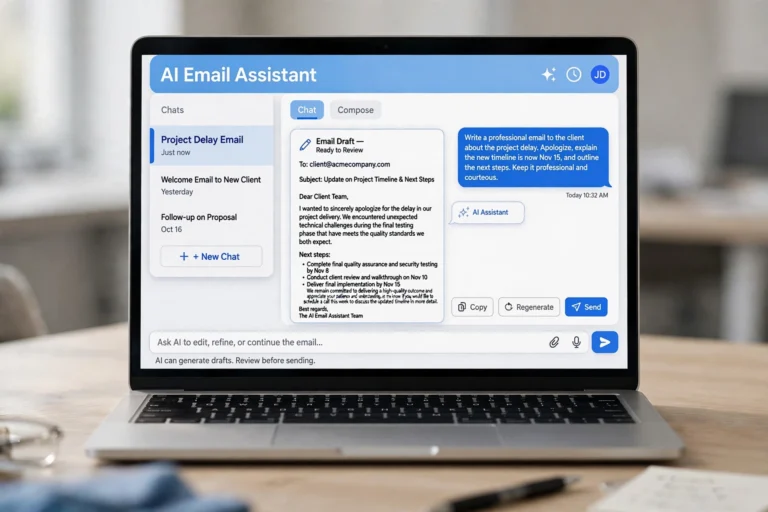
How to write AI prompts for beginners is simpler than most people expect: a prompt is just the instruction you type into an AI tool, and the quality of the answer depends almost entirely on the quality of that instruction. Most beginners get disappointing results not because the AI is weak, but because their prompts are vague — one short line like “write about marketing” cannot produce a great answer. The good news is that writing better prompts is a learnable skill, and this guide teaches it in plain language.
By the end of this guide you will know a simple five-step formula for writing prompts, ten ready-to-use examples, and the mistakes that make beginners’ prompts fail. No technical background needed.
What Is an AI Prompt (And Why Does It Matter)?
An AI prompt is the message, question, or instruction you give to an AI tool such as ChatGPT, Gemini, or Claude. Think of it like giving directions: “take me somewhere nice” gets a random ride, while “take me to the seafood restaurant on 5th Street” gets exactly what you want.
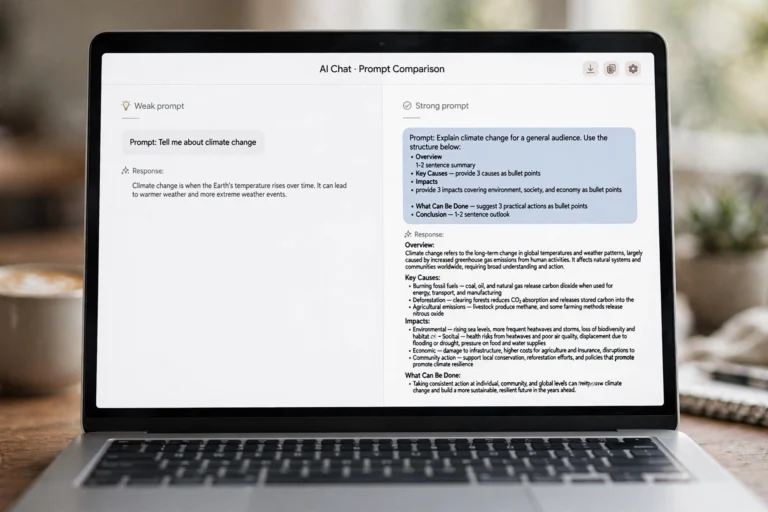
The difference between a weak prompt and a strong prompt is dramatic:
Weak prompt: Write a birthday message.
Strong prompt: Write a warm, funny birthday message for my best friend who just turned 30. She loves hiking and terrible puns. Keep it under 50 words so it fits in a greeting card.
The first prompt produces a generic message anyone could receive. The second produces something personal, funny, and the right length — because every detail you add is a decision you no longer leave to chance. If you are still getting set up with a chatbot, our How to Use ChatGPT for Beginners guide walks you through the interface first.
The 5-Step Prompt Formula for Beginners
You do not need to memorize dozens of techniques. This five-step formula — Role, Task, Context, Format, Example — covers about 90% of what beginners need. Include as many of the five as you can, and your results will improve immediately.
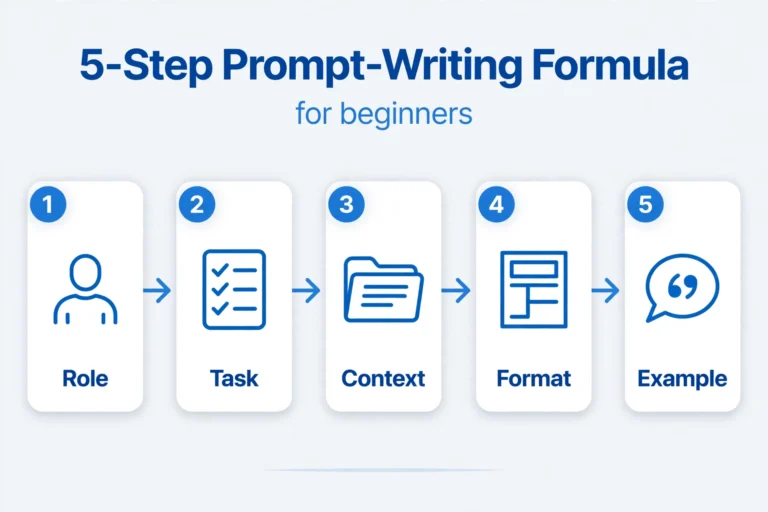
1. Role: Tell the AI who to be
Assign the AI a role, such as “You are a friendly fitness coach.” This single line steers the tone, vocabulary, and depth of the answer — a “patient math tutor” explains things very differently from a “brutally honest business consultant.”
2. Task: State exactly what you want
Be precise about the job. Instead of “help me with my resume,” say “write three resume bullet points for my two years as a retail cashier, focusing on customer service.” Our 15 ChatGPT Prompts for Resume Writing has ready-made examples for this exact task.
3. Context: Share the background
Context is what the AI cannot guess: who the answer is for, why you need it, any constraints. “Explain taxes” is a terrible prompt. “Explain income tax for a 19-year-old college student with a part-time job, in simple language” is a great one.
4. Format: Describe the shape of the answer
Tell the AI how to structure its response: a bullet list, a table, step-by-step instructions. You can also set length: “in under 100 words” or “as a 5-item checklist.” Without format instructions, the AI guesses — and usually guesses a long wall of text.
5. Example: Show it what “good” looks like
If you have a sample of the style you want, paste it in. “Write product descriptions in this style:” followed by one example is more powerful than three paragraphs of description.
Put together, a full formula prompt looks like this:
Full example: You are a friendly cooking instructor (Role). Give me 5 easy dinner recipes I can make in under 30 minutes (Task). I am a beginner cook with only a stovetop and a microwave (Context). List them as a numbered list with ingredients and time for each (Format).
10 Copy-Paste AI Prompt Examples for Beginners
The fastest way to learn is by using prompts that already work. Try these in any AI chatbot and notice how specific each one is:
Explain how credit cards work as if I am 12 years old. Use one simple analogy and keep it under 150 words.
Act as a travel planner. Plan a 3-day budget trip to Chicago for two people. Include one must-see attraction per day, food recommendations, and estimated costs in a table.
Write a polite but firm email declining a meeting request because of a scheduling conflict. Suggest two alternative times. Keep it professional and under 80 words.
You are a personal trainer. Create a 20-minute home workout for a complete beginner with no equipment. Format it as a numbered list with the time for each exercise.
Summarize this article in 5 bullet points, written for a busy person who only has 30 seconds: [paste your article text here].
Brainstorm 10 names for a small bakery that sells sourdough bread. Make them warm and memorable, not generic. Number them.
Help me prepare for a job interview for a barista position. Ask me one practice question at a time, wait for my answer, then give me feedback before asking the next.
Translate this paragraph into Spanish, then explain any grammar choices a beginner should know: [paste your paragraph here].
Create a simple weekly meal plan for someone trying to eat healthier on a tight budget. Make it a table with days, breakfast, lunch, and dinner. Keep meals realistic for a beginner cook.
Proofread this text and list every correction in a table with three columns: the mistake, the fix, and a one-line explanation of the rule: [paste your text here].
How to Fix a Bad Answer With Follow-Up Prompts
Beginners make one big mistake: they accept the first answer and move on. The AI remembers what you said earlier in the chat, so refining is just a matter of replying.
When an answer is not quite right, use one of these follow-up prompts:
- “Make it shorter.” Instantly trims a long answer down to the essentials.
- “Explain that again with an example.” Fixes answers that are too abstract.
- “Rewrite that for a beginner.” Lowers the complexity when the AI assumes too much knowledge.
- “Give me 3 more options like the second one.” Great for brainstorming when one idea is close but not perfect.
- “Turn that into a table.” Reorganizes messy paragraphs into something scannable.
- “That was not what I meant. I wanted…” Corrects a misunderstanding — the AI adjusts fast when you are direct.
7 Mistakes Beginners Make When Writing AI Prompts
Avoid these seven common errors and you will already prompt better than most casual users:
- Being too vague. “Write about dogs” produces generic filler. Add a topic angle, audience, length, and tone.
- Asking five things at once. A prompt that requests a summary, a translation, a rewrite, and an opinion gets a muddled answer. Split complex jobs into separate prompts in the same conversation.
- Skipping the audience. The AI does not know who the answer is for unless you say so — a child, a beginner, a professional.
- Forgetting the format. If you do not ask for bullets, a table, or a word limit, you will usually get a wall of text.
- Starting a new chat for every tweak. Keep refining in the same conversation so the AI keeps the context. Start fresh only when you switch to a completely new topic.
- Trusting facts blindly. AI tools sometimes state wrong information with total confidence — especially dates, statistics, prices, and legal or medical details. Verify anything important with a trusted source.
- Pasting sensitive data. Never put passwords, bank details, medical records, or private company information into a prompt. Treat the chat window like a public conversation.

FAQ
Do I need to learn special syntax to write AI prompts?
No. Plain, clear language works best — write to the AI the way you would explain something to a person. The five-step formula in this guide uses no code or special commands.
How long should a good prompt be?
Long enough to include the key details, short enough to stay focused — most strong beginner prompts are 30 to 80 words. If yours is longer, check whether you are asking for several things at once and split it into steps.
Can the same prompt work on different AI tools?
Mostly yes. A well-written prompt works across ChatGPT, Gemini, Claude, and other chatbots because the principles — specificity, context, format — are universal. We compare the two biggest ones in Gemini vs ChatGPT: Which Is Better in 2026?
Why does the AI give me a different answer every time?
AI chatbots generate responses probabilistically, so the same prompt can produce slightly different wording each time. If you need more consistency, make your prompt more specific — especially the format and constraints.
Should beginners use the free version of AI tools?
Absolutely. Free plans are more than capable for learning prompt writing. You only need to upgrade if you hit usage limits — and by then, your prompting skills will make the upgrade worth it.
Conclusion
Learning how to write AI prompts for beginners comes down to one habit: stop typing one vague line and start giving the AI a complete brief. Assign it a role, state the exact task, add your context, describe the format you want, and show an example when you can. Then refine with follow-ups instead of settling for the first answer.
Start today with one of the copy-paste prompts above, tweak it for your own needs, and practice the follow-up technique. Within a week of daily use, clear prompting will feel automatic.