How to Sell Photos Online for Beginners (2026)
How to sell photos online for beginners is straightforward: upload your photos to stock sites like Adobe Stock or Shutterstock, add accurate titles and keywords so buyers can find them, and earn a royalty every time someone downloads your image. Your phone camera is enough to start — buyers in 2026 want authentic, real-life photos more than polished studio shots. Expect your first payouts within 1–3 months, not days.
This guide covers where to sell, what actually sells, the pricing reality nobody tells beginners, and the exact upload workflow that gets photos accepted.
Where to Sell: The Best Platforms for Beginners
Stock Photo Agencies
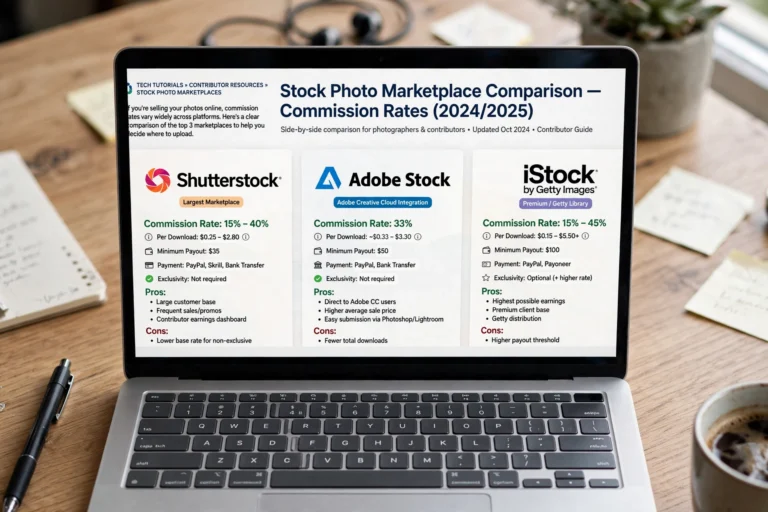
Adobe Stock — The beginner favorite. Easy uploads, fair royalties (33% on photos), and your images appear inside Adobe’s creative apps where millions of designers shop. Free contributor account, straightforward review process.
Shutterstock — The biggest marketplace by volume. Royalties start lower ($0.10–$2 per download for new contributors) but the sheer buyer traffic means more downloads. Worth being on despite the low per-sale rate.
Getty Images / iStock — Prestigious and pickier. Harder to get accepted, but higher prices per download. Apply once you have 50+ strong images and understand keywording.
Alamy — Higher commission rates (up to 50%) and less competition than the giants. Slower sales, but each sale pays more. Good second platform.
Sell Direct (Higher Margins)
Etsy — Sell prints, wall art, and digital downloads directly to buyers. You set the price and keep most of it. Best for artistic, decorative, and niche photography.
Your own site + print-on-demand — Services like SmugMug or Printful let you sell prints without handling inventory. More work to set up, but full control and the best margins.
My recommendation for beginners: start with Adobe Stock + Shutterstock. They are free, accept phone photos, and teach you the keywording skills that transfer everywhere.
What Actually Sells in 2026
Forget sunsets and flowers — those categories have millions of competing images. What buyers search for and cannot find enough of:
- Authentic lifestyle: real families, real workplaces, real emotions — diverse, unstaged, everyday life.
- Business and work: remote work setups, meetings, hands typing, video calls, small business owners.
- Food and cooking: overhead recipe shots, ingredients, messy real kitchens (not just perfect plates).
- Health and wellness: exercise, healthy food, mental health concepts, medical settings.
- Seasonal content: holidays, back-to-school, summer activities — uploaded 2–3 months before the season.
- Concepts and metaphors: teamwork, growth, technology, finance — abstract ideas buyers illustrate articles with.
- Local and niche: your town, your culture, your hobbies. Underrepresented niches have almost no competition.
The golden rule: photograph what buyers need, not what photographers like. Check a stock site’s search results for your idea — if page one is weak, that is your opportunity.
The Upload Workflow That Gets Accepted
Rejections discourage most beginners. Follow this process and your acceptance rate will be dramatically higher:
- Shoot with intent. Before pressing the shutter, ask: “Would a blogger, advertiser, or designer pay for this?” If yes, shoot it cleanly.
- Edit lightly. Straighten, crop, fix exposure and white balance. Do not over-filter — buyers want natural, usable images.
- Export properly. JPEG, sRGB color, longest edge 4000+ pixels for most agencies. Sharp at 100% zoom — check before uploading.
- Title descriptively. “Smiling mother and daughter cooking pancakes together in bright kitchen” beats “Family time.” Think like a searcher.
- Keyword thoroughly. Add 25–40 relevant keywords: what, who, where, mood, concept. Include synonyms buyers might use.
- Categorize correctly. Put lifestyle shots in Lifestyle, food in Food and Drink. Miscategorized images get rejected.
- Submit and wait. Reviews take 2–7 days typically. Do not re-upload rejected images unchanged — fix the issue first.
Common rejection reasons: noise/grain, out of focus, overexposure, logos or brands visible, recognizable people without model releases. For recognizable faces, you need a signed model release — agencies provide free templates.

The Pricing Reality (Read This Before You Start)
Nobody tells beginners this clearly, so here it is:
- Per-download royalties are small. Expect $0.25–$2 per standard download on major agencies as a new contributor. Yes, really.
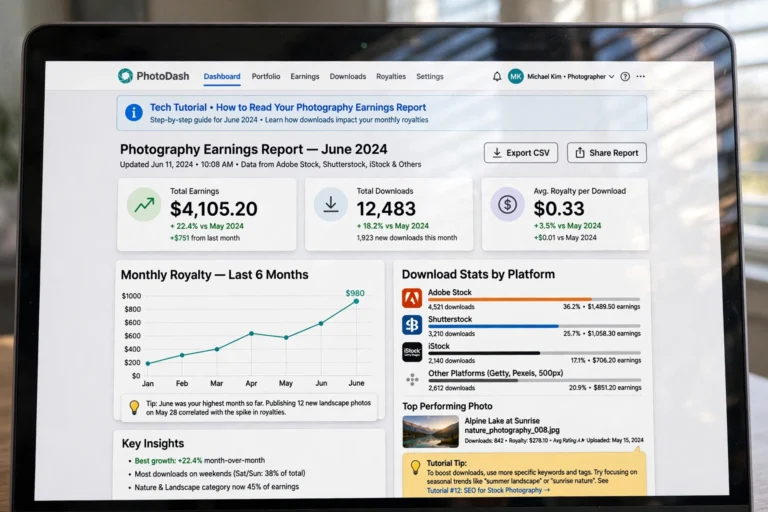
- Volume is the business model. Contributors earning $500+/month typically have 1,000–5,000+ images online. Each image earns a little; thousands earn a lot.
- It compounds. An image uploaded today can sell for years. Your catalog is an asset that keeps working while you sleep.
- Direct sales pay more per sale. A $30 print on Etsy beats 100 stock downloads — but requires marketing effort stock sites handle for you.
- First payout timeline: most beginners see their first payout ($25–$50 minimums) within 1–3 months of uploading 100+ quality images.
This is a slow-build income, not fast cash. If you need money this week, see 11 Legit Survey Sites That Pay Cash. If you want an asset that grows, keep reading.
Phone Photography Tips That Actually Matter
You do not need a $2,000 camera. You need these habits:
- Clean your lens. The single biggest quality upgrade, and it is free. A smudged lens ruins otherwise great shots.
- Shoot in good light. Window light and golden hour beat any flash. Avoid harsh midday sun and dim yellow interiors.
- Leave copy space. Buyers add text to images — photos with clean, empty areas (sky, walls, blurred backgrounds) sell far better.
- Shoot series, not singles. One concept, 10–20 variations: different angles, orientations, with and without people. Buyers love options.
- Check sharpness at 100%. Zoom all the way in before uploading. Slightly soft images get rejected; slightly noisy ones too.
Want to level up your editing? Our 7 Free AI Headshot Generators guide covers free AI tools that also work for polishing stock submissions.
FAQ
Can I sell photos online with just a phone?
Yes. Modern phones produce images sharp enough for stock agencies, and buyers increasingly prefer authentic phone-style photography. Clean lens, good light, and proper exporting matter far more than the camera brand.
How much do beginners make selling photos online?
Most beginners earn $25–$100/month in the first six months with a few hundred images online. Contributors with 2,000+ quality images commonly earn $300–$1,000/month. The income scales with catalog size, not talent alone.
Do I need model releases for photos of people?
Yes, for any recognizable person — agencies require a signed release from every identifiable individual, including friends and family. Agencies provide free release templates, and phone-signature apps make it painless. No release means no sale for people photos.
Which stock site pays the most?
Per download, Alamy and Getty pay the highest rates — but they have fewer buyers and stricter reviews. For total beginner earnings, Adobe Stock usually wins through a balance of fair royalties and high buyer traffic.
Can I sell the same photo on multiple sites?
Yes — non-exclusive contributors can upload the same images everywhere (Adobe Stock, Shutterstock, Alamy simultaneously). Only sign exclusivity deals if the premium pay genuinely justifies locking your work to one platform. For beginners, non-exclusive everywhere is the right call.
Conclusion
How to sell photos online for beginners comes down to a simple loop: shoot what buyers need (authentic, useful, well-keyworded), upload to Adobe Stock and Shutterstock, and repeat until your catalog hits critical mass. Your first 100 images teach you the system; your first 1,000 build the income.
Start this weekend: photograph ten everyday concepts around your home, keyword them properly, and submit your first batch. Then keep the loop running — consistency builds catalogs, and catalogs build income.
Related: How to Make Money Online as a Teenager for young photographers, and 15 ChatGPT Prompts for Resume Writing if you are pitching photography services to local clients.